A sculptural black smartphone displaying a booking checkmark, with jade-green fabric on sunlit concrete.

Get found.
Get booked.

In a demo for your business, see how VernoWeb replies to new leads, asks the right questions, and books the jobs that fit.

Request my demo

We’ll email you to arrange a time.

Get discovered.Ads in your service area

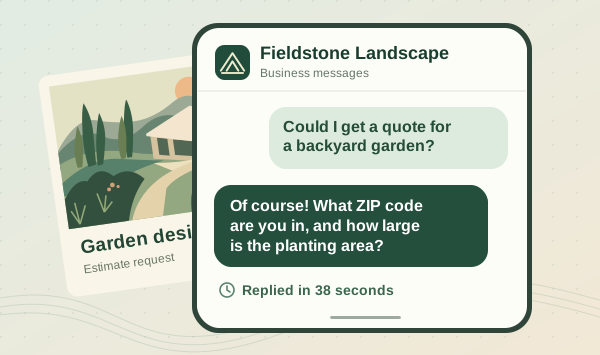
Reply in a minute.Even while you’re on a job

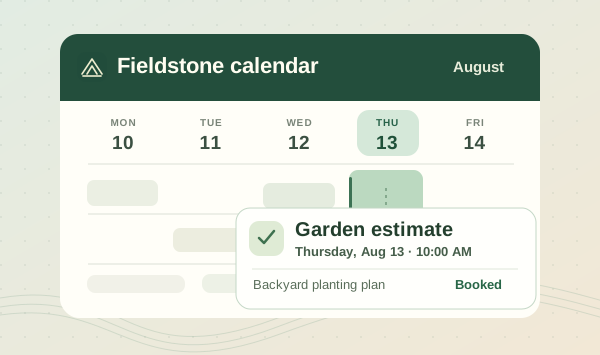
Book the right jobs.Straight to your calendar

See what happens
after the click.

Bring a typical customer inquiry. We’ll show you the reply, the questions, and the path to booking for your business.

Request my demo

We’ll email you to arrange a time.

  1. The first reply.

    See the text a new lead would receive while you’re busy with a customer.

  2. The right questions.

    Walk through how inquiries are checked against your services, locations, and job types.

  3. The next booking.

    See how a qualified customer picks a time and how the job details reach you.

One inquiry.
Every next step.

This example follows a landscaping inquiry. Your demo focuses on the work you want to book.

Reach customers in your service area.

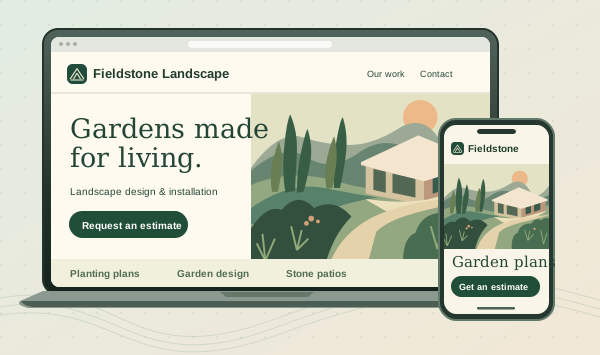
Your Facebook and Instagram ads show the kind of work you do. Customers can click through to your website, describe the job, and ask for an estimate.

Local customers see your work on Facebook or Instagram and can request an estimate on your site.

A landscaping website on a laptop and phone, with an illustrated garden and an estimate button.

Good questions.
Straight answers.

Is this a fit for my business?

VernoWeb is built for service businesses that turn inquiries into estimates or appointments. We’ll discuss the services you offer, where you work, and the jobs you want to book.

Will the AI book every inquiry?

You choose the services, locations, and job types you want. If a request needs your judgment, it can go to your team.

What if I already have a website?

Bring your website link. We’ll walk through how someone requests an estimate today and show where follow-up or booking could be easier.

Can I use my current calendar?

Tell us which calendar you use. We’ll check availability, working hours, and appointment types with you before recommending a setup.

What happens after I send the form?

We save your demo request, then follow up by email to arrange a time. You’ll see a request confirmation after the form is saved.

What should I bring to the demo?

A typical customer question, the services and areas you want to book, and your website link if you have one.

Let’s walk through
your next inquiry.

See what a customer would experience—from their first question to a time on your calendar.

  1. Tell us about your business.

    Leave your name, email, and business name. Choose a demo topic if you have one in mind.

  2. Arrange a time by email.

    We’ll follow up to find a time that works for you.

  3. See your customer’s next steps.

    Bring an example inquiry. We’ll walk through the reply, qualification, and booking together.

Request your demo

Leave your details and we’ll email you to arrange a time.

Learn how we use your details in our privacy policy.